Introducing NFT Backup - Effortless, Multi-Chain NFT Preservation

At Filebase, we believe digital ownership should come with digital permanence. NFTs are more than just tokens — they’re artwork, identity, cultural artifacts, and in many cases, critical business assets. Yet the content behind them is often fragile, unpinned, or hosted on brittle infrastructure that can disappear without warning.
Today, we’re excited to introduce NFT Backup, a new Filebase feature that makes preserving your NFT data effortless, automated, and truly multi-chain.
A Dedicated NFT Backup Experience — Now in the Filebase Plugins Menu
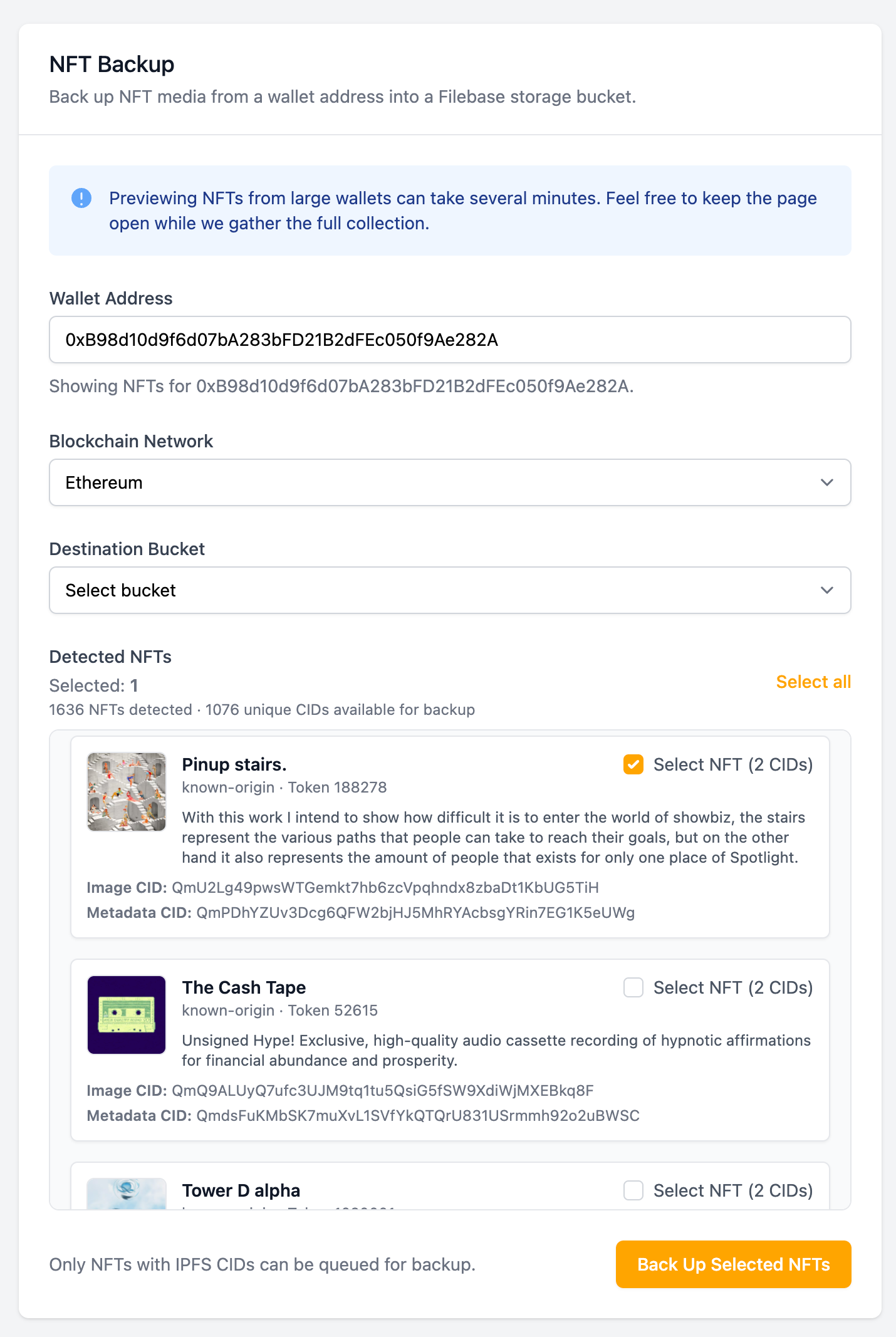
NFT Backup lives inside your Filebase dashboard under the new Plugins section. Simply choose your chain, enter your wallet address, and Filebase automatically scans your wallet for all NFTs referencing IPFS.
We detect IPFS CIDs across your metadata, media, and image fields, then prepare a complete preview of your collection before anything is pinned.
Launching With Support for 24 Chains
At launch, NFT Backup supports 24 chains, making this one of the most extensive multi-chain NFT preservation tools available:
- Abstract
- Ape Chain
- Arbitrum
- Avalanche
- B3
- Base
- Bera Chain
- Blast
- BSC
- Ethereum
- Flow
- Gunzilla
- HyperEVM
- Immutable
- Optimism
- Polygon
- Ronin
- Sei
- Shape
- Solana
- Somnia
- Soneium
- Unichain
- Zora
Whether your NFTs live on Ethereum, Polygon, Solana, Immutable, Base, or any of the fast-growing chains listed above, NFT Backup makes it easy to preserve them.
Preview Before You Pin
Once your wallet scan is complete, you’ll see a detailed visual preview for every NFT, including:
- Metadata content (title, description, attributes, etc.)
- Identified metadata CID
- Identified image/media CID
- Rendered preview of the artwork
This makes it easier than ever to validate what you’re backing up — and confirm that the content actually matches the NFT.
Note: For wallets with very large NFT inventories, the preview step can take several minutes — this is because Filebase is resolving, validating, and analyzing all IPFS-related content across your entire collection.
Back Up Your NFTs in One Click
After previewing, select the NFTs you want to preserve (or click Select All), choose a target bucket, and click Submit.
Filebase will automatically fetch and pin the relevant IPFS content directly into your bucket, ensuring your NFT data is:
- Safely pinned, preserved, and highly available
- Easily accessible
- Served from high-performance, bare-metal IPFS gateway infrastructure
- Protected from third-party failures, API shutdowns, or upstream outages
With NFT Backup, you maintain complete control of your digital assets — not the marketplace, not the RPC provider, not the hosting service. You.
Why NFT Backup Matters
In recent years, we’ve seen countless examples of NFT content disappearing due to:
- Marketplace shutdowns
- Gateway failures or outages
- Cloud provider downtime
- Unmaintained or rate-limited infrastructure
NFT Backup prevents those issues by giving you a simple, automated way to permanently preserve the content that defines your NFTs.
Your content should be as permanent as your ownership. Filebase makes that easy, fast, and secure.
Special Launch Offer — 1 Month Free
To celebrate this launch, we’re offering one month free on the Filebase Starter plan when you use promo code NFT at checkout.
Start Backing Up Your NFTs Today
NFT Backup is available now in the Filebase dashboard under Plugins.
Preserve your NFTs across 24 chains — automatically, reliably, and at scale.
Your digital assets deserve a home built for permanence. With Filebase, now they have one.